How to Check a Car's Service History for Free in 5 Steps
Learn how to check service history of car for free in 5 steps. Use MOT data, registration lookups and garages to spot gaps and red flags.
How to Check a Car's Service History for Free in 5 Steps
The reliable way to learn how to check the service history of a car for free is to work through five sources in order: the GOV.UK MOT history, a free service history check by registration, the manufacturer's owner account, the dealer or garage that did the work, and the seller's paperwork. Then lay what you find against the MOT mileage readings. No single source is complete, but together they show whether a car was serviced on time.
The problem is that no central register exists. The DVLA does not hold service records, and servicing is optional by law, so the evidence is scattered across dealer systems, garage invoices and stamped books that go missing. A seller who says "full service history" may be telling the truth, or may be holding three unrelated receipts. As a buyer you also cannot log into the manufacturer's records, because the car is not yet in your name.
This guide walks through each step in the order that saves you the most time, with the screens, requests and checks to use. It covers buyers and owners, what to do when the book is lost, and a worked example that shows how to spot a missed service. Vehiclepedia, a UK vehicle history check service, offers a free reg lookup and a free service history check, so we point out where they fit.
What service history is and where it is kept
Service history is the record of maintenance carried out on a car, with the date and mileage of each visit. It lives in several places at once, and knowing which one holds what tells you where to look first when you want a car service history check for free.
What counts as service history
Service history covers scheduled services, oil and filter changes, inspections, brake work and replaced parts. Each entry should show a date, a mileage and who did the work. MOT history is a different record. It is the result of an annual roadworthiness test, stored centrally and free to view.
Servicing is optional, so no government body collects it. That is why a search on GOV.UK for a car's service history only ever turns up MOT records. The two records answer different questions, and you need both.
MOT history shows that a car passed a test once a year. Service history shows whether anyone looked after it in between.
Where the records are kept
Records sit with whoever did the work, and each source has its own access rules. This table shows what each source holds and what it costs you.
| Source | What it holds | Who can see it | Cost |
|---|---|---|---|
| GOV.UK MOT history | Test dates, mileage, advisories, failures | Anyone with the registration | Free |
| Free service history check by reg | Services logged in manufacturer and dealer networks | Anyone with the registration | Free |
| Manufacturer owner app or account | Digital service record logged by dealers | The registered keeper | Usually free |
| Dealer printout of the digital record | The same digital record on paper | The keeper, or a seller with the V5C | Often free, an admin fee is possible |
| Paper service book | Stamps from each service | Whoever holds the book | Free |
| Garage invoices | Itemised work, parts, date, mileage | The customer who paid | Free, some garages charge for duplicates |
Digital service records began alongside paper books in the early 2010s. Ford, for example, says it has used them since around 2013. A car older than that may only have paper evidence, and a stand-alone oil change or a minor service may never reach the digital record at all.
What FSH, FDSH and PSH mean
Adverts use shorthand for service history. These labels are claims, not proof, so treat each one as something to verify in the steps below.
- FSH (full service history): the car was serviced at every interval the maker recommends, with evidence for each.
- FDSH (full dealer service history): every one of those services was done at a franchised dealer for that make.
- PSH (part service history): some services are evidenced and some are missing.
- No history: nothing can be shown, which may mean the car was never serviced or that the paperwork is gone.
Step 1. Pull the free MOT history first
Start with the GOV.UK check MOT history service. Enter the registration and write down every test date and mileage. This is the only fully independent mileage record you can get for free, and it becomes the timeline you test every service claim against.
Get the registration and VIN
You need the registration plate for every check in this guide. Also note the VIN (vehicle identification number), which is printed on the V5C and is usually visible at the base of the windscreen on the driver's side. Some checks and dealer requests ask for it.

If you are buying, make sure the VIN on the car matches the V5C and any paperwork the seller shows. A mismatch means you stop and ask why before you do anything else.
Record the timeline
Open the MOT history and copy out the details below for each test. Vehiclepedia's free MOT check shows the same history with comments and advisories, plus the current status and a countdown to the due date.
- The test date and result (pass or fail).
- The odometer reading at each test.
- Any advisories and failure reasons.
Three things to look for straight away. A car under three years old has no MOT record yet, so the timeline starts later. A mileage reading that falls or stays flat between tests is a warning sign. And an advisory that repeats year after year, such as worn brake discs, suggests maintenance was not being done. Vehiclepedia's free check also raises instant warnings for mileage trends, sudden drops and DVLA discrepancies, which saves you spotting them by eye.
The MOT timeline is your yardstick: every service claim in the rest of this guide has to fit between its dates and mileages.
Step 2. Run a free service history check by reg
Enter the registration into a free service history check and read what it returns. Vehiclepedia's service history check uses data from official manufacturer and dealership networks, so it can show recorded services without you needing the keys, the book or the seller's login.
Enter the registration
Type the plate into the check and run it. The result shows the date and mileage of every recorded service, and the type of work, from oil changes and inspections to brake servicing and major maintenance. Coverage includes Audi, BMW, Mercedes-Benz, Ford, Volkswagen and Kia, among other brands.
Keep your MOT timeline open next to it. You are going to compare the two in Step 5, and it is easier if the numbers are in front of you now.
Read the result
The check classes a history as complete, partial or missing. Each result calls for a different next move.
| Result | What it means | What to do next |
|---|---|---|
| Complete | Services appear at regular intervals | Confirm with the book or invoices, then compare against MOT mileage |
| Partial | Some services recorded, with gaps | Ask the seller or owner to account for each gap |
| Missing | No services found in the networks searched | Do not assume neglect, move to Steps 3 and 4 |
When the result is thin
A thin result is not proof that the car was ignored. Dealer and manufacturer networks only log work that was entered into them, so independent garage servicing often leaves no trace there. Older cars may have paper records only, and an import may have its history in another country's system.
If the result is partial or missing, the work to do is to find the paper trail. That is what Steps 3 and 4 are for. Treat the free check as a fast first filter, not the final word.
A missing result means "not found in the networks searched", not "never serviced".
Step 3. Check the manufacturer's owner account
If you are the registered keeper, add the car to the manufacturer's owner app or website and look at its service record. Most major makers offer this, and the records appear free once ownership is confirmed. Buyers cannot use this route until the car is in their name.
If you own the car
Ford's process is a good model, and other makers work in a similar way. Add the vehicle to your account using the registration or VIN, then:
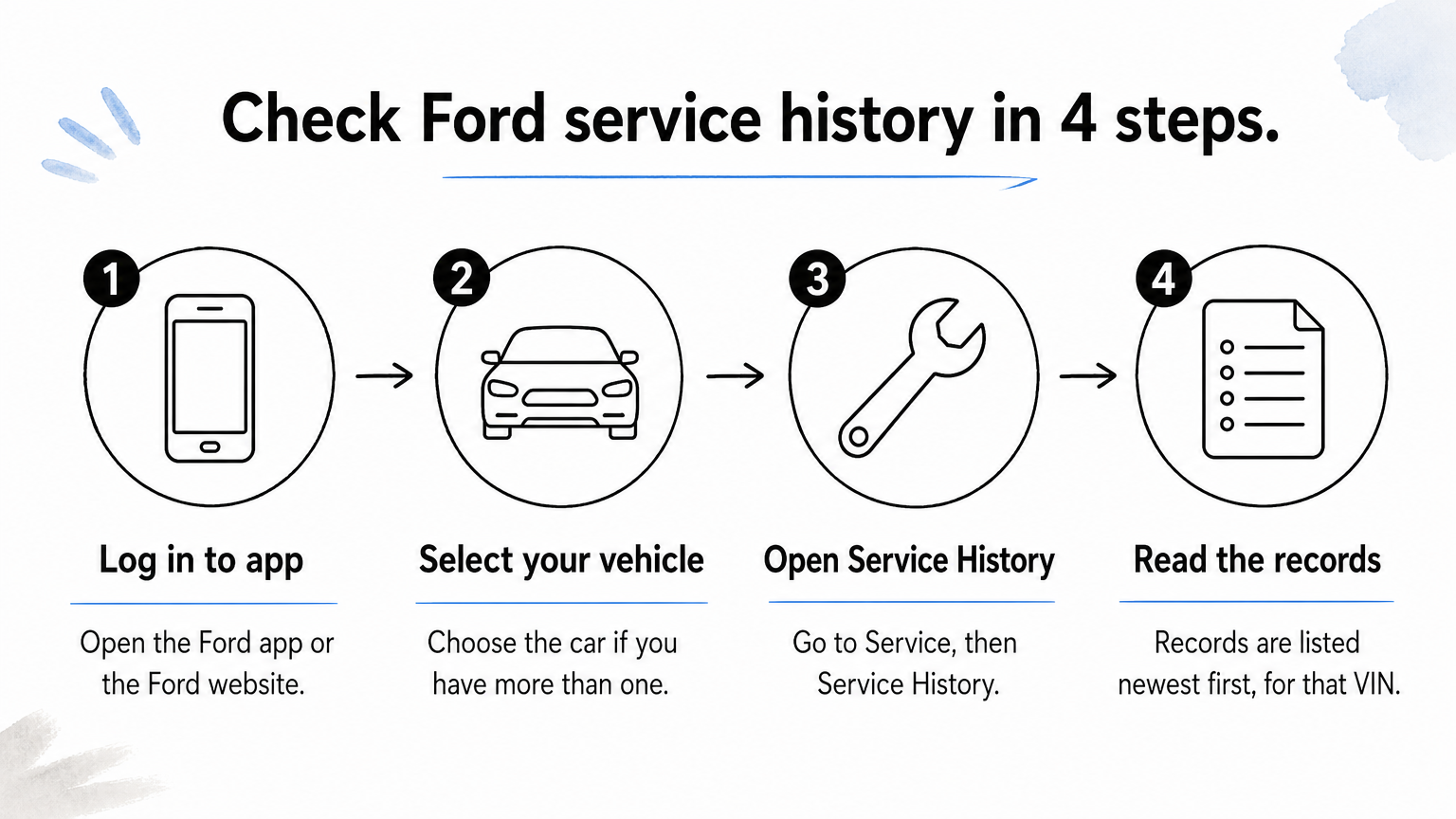
- Log in to the Ford app or the Ford website.
- Select the vehicle if you have more than one.
- Open Service, then Service History.
- Read the records, newest first, for that VIN.
For other makers, look for the brand's own owner app or account, such as the Kia app or Mercedes me. If you cannot find it, a franchised dealer for that make can usually print the record for you.
What manufacturer records leave out
Digital records are not a full diary of the car's life. Ford states that its record mainly logs major scheduled services. Minor services, interim services, complimentary health checks and stand-alone oil or filter changes may not appear, whether a dealer or an independent did the work.
Independent garages can add entries only if they are registered with the maker's service system and log the work manually. There can also be a short delay before a new service shows up. If an entry is missing, ask the garage that did the work, not the maker's customer service line. Ford says its customer centre does not hold service records centrally.
If you are still buying
Makers will not release a car's history to someone who is not its registered keeper, partly because of data protection rules. Ford says so explicitly. The seller has to show you the record.
Ask them to open the owner app and let you see the screen. Or ask them to get a dealer printout. Ford says a private seller can get a printout of the digital record from any Ford dealer by showing their V5C, and other makers have similar processes.
The owner account is the best free source, but only the registered keeper can open it.
Step 4. Ask the dealer, garage or seller
When apps and lookups run out, ask the people who did the work or who hold the paperwork. Dealers and garages keep their own files, and sellers should have a service book and invoices. This step is where gaps are filled and claims are checked.
Request records as the owner
If the service book is lost, contact the last place that serviced the car. Have the registration, the VIN and your V5C to hand, because the garage will want proof that you are the keeper. A franchised dealer can print the digital record for you. An admin fee may apply, so ask before you go.
For independent garages, ask for duplicate invoices. Many keep records for several years. If you do not remember where the car was serviced, search your email and bank statements for garage names, and ask the previous keeper if you bought the car second hand. Do not ask the DVLA, because it does not hold service records.
Ask the seller the right questions
A vague question gets a vague answer. Send something specific, and send it before you travel to see the car. This message works for a private seller or a dealer:
Hello, I'm interested in the [make and model, registration].
Could you send clear photos of every stamped page in the service book,
plus invoices from the last three services?
Which garage or dealer did each service, and may I phone them to confirm?
If the car has a digital record, could you show it in the owner app
or get a dealer printout? Thanks.
Be wary if the seller cannot produce anything at all, or if the paperwork arrives only after several reminders. A genuine history is easy to photograph and easy to explain.
Verify what you are shown
If you buy from a dealer, it should hand over the service book and a printout of the digital record. Ask to see both so you can check they match, and ask the dealer to show the record on its own system if you have doubts. With a private seller, ask for the book and the invoices together.
Then phone one of the garages named on an invoice. A real garage can confirm that it did the work, on roughly which date and at what mileage. It takes five minutes and it is the single best test of a stamp or an invoice.
Phone the garage on the invoice. Genuine work is easy to confirm, and forged paperwork rarely survives one call.
Step 5. Compare the records and spot the gaps
Put every service you have found next to your MOT timeline and look for years with no service. A service dated between two MOTs must fit the mileage on either side of it. Gaps and impossible mileages are what separate a full history from a part history, whatever the advert says.
Work through an example
Most cars are due a service every 12 months or at a set mileage, whichever comes first. Your handbook gives the exact figure, and some cars use a variable interval shown on the dashboard. This example uses a car on a 12-month or 10,000-mile schedule.
| MOT date | MOT mileage | Service on record | Verdict |
|---|---|---|---|
| March 2023 | 28,400 | February 2023, 28,100 miles | On schedule |
| March 2024 | 37,600 | February 2024, 37,300 miles | On schedule |
| March 2025 | 47,100 | None | Service missed |
| March 2026 | 55,900 | March 2026, 55,800 miles | Back on schedule |
The car covered 9,200, 9,500 and 8,800 miles in the three years between tests. Yet it went from 37,300 to 55,800 miles, a gap of 18,500 miles, with no service in between. That is one missed year, so this car has part service history, not full history, even if every stamp it does have is genuine.
Red flags in the paperwork
Mileage that does not fit the timeline is the most useful warning. Check for these:
- A service dated between two MOTs whose mileage is higher than the later MOT reading.
- Stamps in identical ink and handwriting for services years apart.
- A dealer stamp for a garage that cannot be found, or that denies the work when you phone.
- Invoices that do not show the registration or VIN, or a mileage that is round every time.
- A "full dealer history" claim where the free check finds no dealer records at all.
Decide what the result means
If you are buying, one missed service is not a reason to walk away. It is a reason to ask why, to have the car inspected, and to use the gap in price talks. Several missed years on a car with a premium badge is a bigger risk, because the repair bills fall on you.
If you own the car, use the same comparison to find which year is missing, then chase that garage or dealer for a duplicate invoice. Keep every new invoice from now on, and ask the garage to log each service in the digital record at the time.
A full service history means no unexplained year between MOTs. Everything else is part history.
Finishing your service history check
Checking a car's service history is a sequence, not a single search. Start with the free MOT history for a mileage timeline, run the free service history check by reg, open the owner account if the car is yours, ask the dealer, garage or seller for paperwork, and compare everything against the MOT dates. Gaps you can explain are fine. Gaps nobody can explain are a price conversation or a reason to walk away.
A good service record only tells you the car was looked after. It does not tell you the car is free of outstanding finance, has never been written off or is not stolen. Vehiclepedia's premium checks cover those risks using finance, police and MIAFTR data, with a data guarantee of up to £30,000 for non-trade users. You can preview a sample premium report to see exactly what it shows before you decide.