Check Car Tax And MOT Online: A Step-by-Step UK Quick Guide
Verify any UK vehicle’s status. Learn how to check car tax and mot online, spot mileage issues, and review MOT failure records before you buy your next car.

Check Car Tax And MOT Online: A Step-by-Step UK Quick Guide
Before you hand over any money for a used car, you need to check car tax and MOT online, it takes less than a minute and could save you from buying a vehicle that's not legal to drive. An untaxed or MOT-expired car can land you with fines, points, or worse, a motor that's been sitting with hidden mechanical problems nobody bothered to fix.
The good news? You can check both for free using just the vehicle's registration number. At Vehiclepedia, we pull data straight from official UK sources like the DVLA to give you a clear picture of any car's tax and MOT status, alongside a full vehicle history if you need it.
This guide walks you through exactly how to check a car's tax and MOT status online, step by step, what each result means, and what to do if something doesn't look right.
What you need before you start
You only need a few things to check car tax and MOT online, and the process is straightforward. Having the right information ready before you start saves you time and means you won't get stuck halfway through a lookup.
The vehicle's registration number
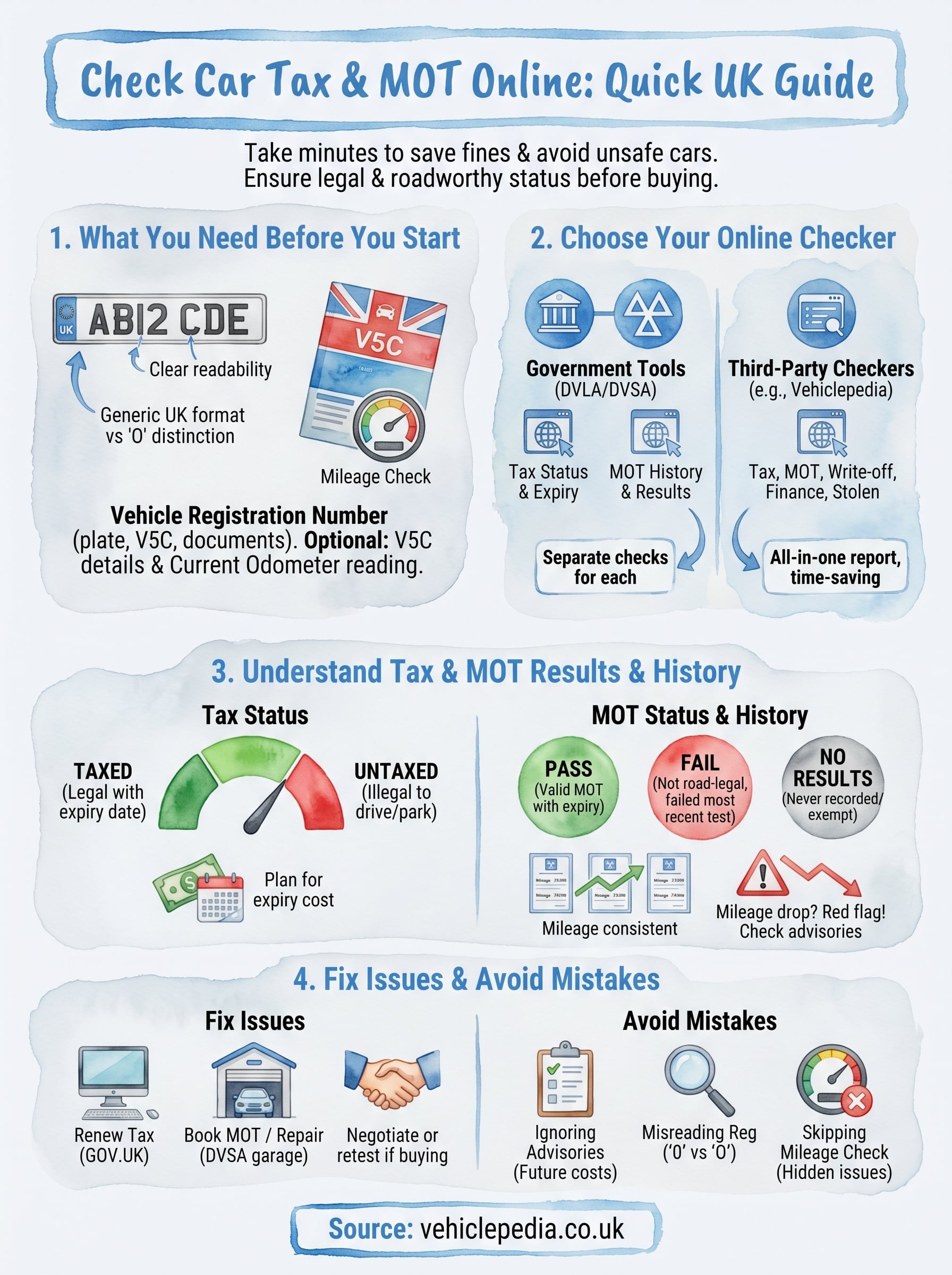
The registration plate number is the only thing you absolutely must have. Every check runs on this number, as it ties directly to the vehicle's record on the DVLA database. For a UK car, this looks like two letters, two numbers, a space, and three letters, for example: AB12 CDE.
Make sure you read the plate carefully. A "0" (zero) and an "O" (letter O) look nearly identical on some plates, and entering the wrong character will either return no results or pull up the wrong vehicle entirely.
You can find the registration number on:
- The front and rear number plates of the vehicle
- The V5C logbook (registration certificate), top right corner
- Any insurance documents or previous MOT certificates
Other details that help you verify the results
Once you get the results back, you'll want to cross-reference them against the physical vehicle. Having a few extra details to hand makes this much easier and helps you spot any red flags quickly.
Bring the V5C logbook if you're buying privately, as it contains the make, model, colour, and engine size, all of which should match what the online check returns. Also note the current odometer reading from the dashboard, because MOT history records show the mileage at each test, and a mileage that drops between tests is a serious red flag worth investigating before you go any further.
Step 1. Choose the right online checker
Two main types of tool let you check car tax and MOT online: government services and third-party checkers. Knowing the difference helps you pick the right one for what you actually need.
Government tools
The DVLA and DVSA both offer free official checks. The DVLA tool shows your vehicle's current tax status and expiry date, while the DVSA's MOT history service shows past test results, advisories, and mileage recorded at each test. These are reliable but cover only one thing at a time, so you'd need to visit two separate pages.
- DVLA tax check: gov.uk/check-vehicle-tax
- DVSA MOT history: gov.uk/check-mot-history
If you want a single lookup that covers tax, MOT, and full vehicle history together, use a dedicated vehicle history checker rather than jumping between two separate government pages.
Third-party checkers
Services like Vehiclepedia pull data from official sources including the DVLA and give you tax and MOT information alongside additional checks such as write-off records, stolen vehicle status, and outstanding finance, all in one report. This saves time when you're evaluating a used car and need a complete picture before committing to a purchase.
Step 2. Check car tax status and understand the result
Enter the vehicle's registration number into your chosen checker and hit search. The result comes back within seconds and tells you whether the vehicle is currently taxed, when the tax expires, and the annual or six-monthly cost. If you're using Vehiclepedia, this appears at the top of the free report alongside other key details.
A car that shows as untaxed is illegal to drive or park on a public road, so treat this as an immediate red flag if you're buying.
What each tax result means
The result will show one of two statuses. Use the table below to interpret what you're looking at:
| Status | What it means |
|---|---|
| Taxed | The vehicle is currently legal to drive, with an expiry date shown |
| Untaxed | Tax has lapsed; the vehicle cannot legally be driven on public roads |
What to do with the expiry date
If the tax expires soon, factor the renewal cost into your budget before you agree to a price. You can check the current Vehicle Excise Duty rates on the GOV.UK website to work out exactly what you'll owe based on the car's fuel type and CO2 emissions.
Step 3. Check MOT status, expiry, and history
Once your tax check is done, run the MOT check using the same registration number. The result shows you whether the current MOT certificate is valid, when it expires, and a full history of every test the vehicle has ever had. This is where you often find the most useful detail when you check car tax and MOT online.
Pay close attention to advisory notes on previous tests, as these flag issues the tester spotted but that were not serious enough to fail the car outright.
Reading the MOT result
The MOT status you receive falls into one of three categories. Each one tells you something specific about whether the vehicle is road-legal right now:
| Status | What it means |
|---|---|
| Pass | The vehicle has a valid MOT with an expiry date shown |
| Fail | The most recent test was failed; the vehicle may not be road-legal |
| No results | No MOT has ever been recorded, or the vehicle is exempt |
How to use the history
Each past test entry includes the date, mileage recorded at the time, and any failure reasons or advisories. Cross-reference the mileage figures across multiple entries: they should increase consistently over time. A figure that drops between tests strongly suggests the odometer has been wound back, which is a serious warning sign on any used car.
Step 4. Fix issues and avoid common mistakes
Finding a problem when you check car tax and MOT online doesn't always mean walking away. Some issues are fixable, and knowing what to do next puts you in a stronger position whether you're buying or already own the vehicle.
Renewing tax or booking an MOT
If the tax has lapsed, you can renew it on GOV.UK using the vehicle's registration and either the V5C reference number or a recent reminder letter. For an expired or failed MOT, book the vehicle in with a DVSA-approved garage as soon as possible, since driving without a valid MOT is illegal on public roads.
If you're buying a car with an expired MOT, ask the seller to get it retested before you complete the purchase, or negotiate the repair costs into the agreed price.
Use these steps to resolve the most common issues:
- Lapsed tax: renew at gov.uk/tax-your-vehicle
- Expired MOT: book with a DVSA-approved garage
- Failed MOT: get the required repairs done, then retest
Mistakes to avoid
Do not assume a passing MOT means the car is problem-free. Advisories on the history report flag real wear and tear that will need attention soon. Check the registered keeper details against the V5C to confirm the seller is listed as the keeper.
Watch out for these common errors:
- Ignoring advisory notes from previous MOT tests
- Misreading a "0" (zero) as an "O" (letter) in the registration number
- Skipping the mileage check across MOT history entries
Quick wrap-up
Running through this guide gives you everything you need to check car tax and MOT online in minutes. You only need the registration number to confirm whether a vehicle is taxed, whether its MOT is valid, and what the test history shows across previous years. Each of those three things tells you something concrete about the car you're considering, and none of it requires you to rely on what a seller tells you.
Before you buy, take the extra step of cross-referencing mileage figures across MOT history entries and checking that the seller's details match what appears on the V5C logbook. If anything looks inconsistent, dig deeper before you commit to a purchase.
Vehiclepedia lets you run a free check using just the registration plate, with the option to unlock a full premium report if you need write-off, stolen vehicle, or outstanding finance data too. See what a full report includes before you decide whether to go further.