Car Data Check by Reg: How to Get Free UK Vehicle Data
Run a car data check by reg in four steps: read MOT, tax and mileage results, match them to the car and know when a premium report is worth paying for.
Car Data Check by Reg: How to Get Free UK Vehicle Data
To run a car data check by reg, type the number plate into a registration lookup, read the MOT, tax, mileage and spec results, then match each one against the car and its V5C log book. A UK car check by reg takes seconds, and the core data costs nothing. Vehiclepedia's free check shows the official records that matter most before you hand over any money.
The trouble is that most lookups look alike but show very different things. Some hide the mileage behind a paywall. Others list pages of specs and never tell you what to do with them. A seller's advert can also be out of date or simply wrong, and a few minutes with the data is the cheapest way to find out.
This guide walks you through four steps, from entering the reg correctly to deciding whether you need a premium report. You will see what the free data covers, how to read an MOT mileage trend, and which problems only a paid check can catch.
What a car check by reg shows and where it comes from
A reg check turns a number plate into a record pulled from official databases. You see a car's identity, MOT, tax and mileage history without relying on the seller's word.
Where the data comes from
Vehiclepedia takes its DVLA data directly from the DVLA API and its MOT history directly from the DVSA. It refreshes from official sources every night, so a failed MOT or a lapsed tax date shows up quickly. Premium records add finance data from Experian Automotive, police theft markers via the Police National Computer, and write-off records from the MIAFTR insurance database.
You only need the registration number to start. GOV.UK runs its own vehicle enquiry service that also takes just the reg and shows tax and MOT status. That makes it a handy second source to confirm what you see.
What is free and what needs a premium report
The free check covers identity, MOT, tax and basic warning flags. Finance, police and write-off checks need a premium report, which includes everything in the free check.
| Data | Free check | Premium report |
|---|---|---|
| MOT status, history and expiry | Yes | Yes |
| Road tax status and yearly cost | Yes | Yes |
| Make, model, age, engine size, CO2 | Yes | Yes |
| Outstanding recall and export status | Yes | Yes |
| Number of owners and salvage status | Yes | Yes |
| Mileage trend warnings | Yes | Yes |
| Outstanding finance | No | Yes |
| Stolen vehicle (police) check | No | Yes |
| Insurance write-off and scrapped checks | No | Yes |
| Ownership history and technical details | No | Yes |
A reg check is only as good as the official databases behind it, so know where each field comes from.
Step 1. Enter the reg number correctly
Enter the reg exactly as it appears on the number plate. Then confirm it matches the advert and the V5C before you trust any result.
Copy the reg from the car and the paperwork
Take the reg from the plate on the car and from the V5C, not only from the listing. Typos creep into adverts, and one wrong character brings up a different vehicle's data. If the three sources disagree, stop and ask the seller why.
Watch the look-alikes. The letter O and the number 0 are easy to swap, and so are the letter I and the number 1. A private plate may also have been moved from another car, so the reg on the V5C is the one that counts.
Run the free check
- Go to vehiclepedia.co.uk and find the free check box.
- Type the registration number.
- Submit it and wait a few seconds for the result.
- Compare the make and model with the car in front of you. A mismatch means a typo or a plate on the wrong car.
- Take a dated screenshot, because MOT and tax data change over time.
Three matching regs, on the plate, in the advert and on the V5C, are the first test any car has to pass.
Step 2. Read the free results
Read the results in a fixed order: MOT first, then tax, then mileage, then the specs and flags. Each one answers a different question about the car.
MOT and tax
The MOT section shows the current status and expiry date, plus the full history with failures and advisories. A car needs an MOT every year once it is 3 years old, so a gap in the history deserves a question. Look for repeated advisories on the same item, such as tyres, brakes or corrosion. They suggest a problem nobody fixed.
Tax shows as taxed, SORN or untaxed, along with the yearly cost. Vehicle tax does not transfer to you when you buy, so you must tax the car yourself before you drive it. Treat the cost as a budget line, because it varies with emissions and engine size.
Mileage trend
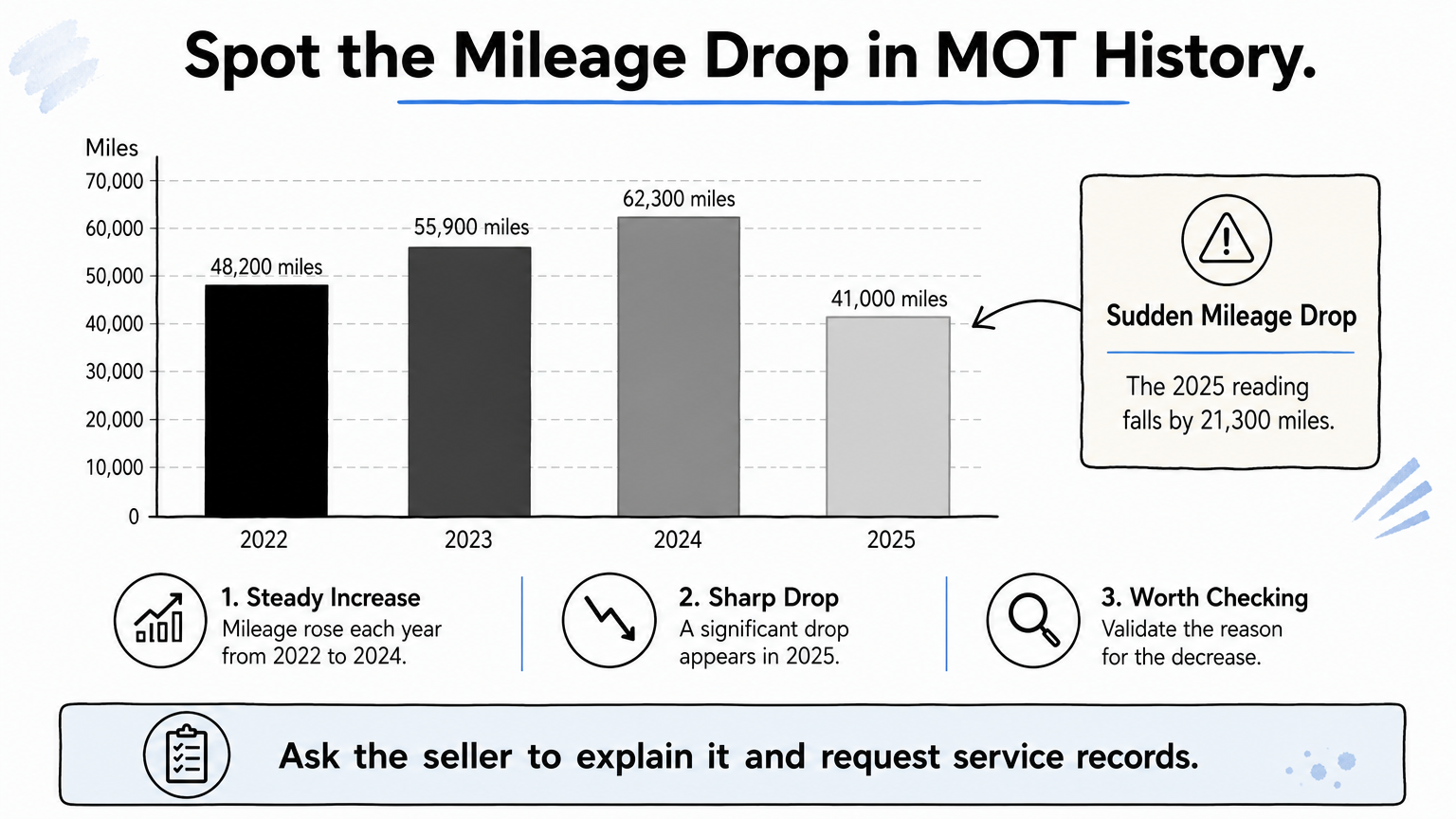
Mileage is where a reg check earns its keep. Vehiclepedia triggers instant warnings for odd mileage trends, sudden drops and DVLA discrepancies in both the free snapshot and the paid report. Here is an illustrative MOT history:
| MOT year | Recorded mileage | Change |
|---|---|---|
| 2022 | 48,200 | n/a |
| 2023 | 55,900 | +7,700 |
| 2024 | 62,300 | +6,400 |
| 2025 | 41,000 | -21,300 |
The first three years climb by about 7,000 miles a year. Then the reading falls by 21,300. It could be a typing error at the test centre, or it could be a wound-back odometer. Either way, ask the seller to explain it and request service records before you go further.
Specs, recalls and export status
Check that the make, model and engine size match the advert, along with the CO2 figure that drives the tax band. An outstanding recall means a safety fix is pending, so ask whether the work has been done. A flagged export status or salvage status is a reason to pause and run a premium report.
Read the mileage trend before the specs, because a sudden drop tells you more than any spec sheet.
Step 3. Match the data to the car and the paperwork
Now check that the record describes the car you are looking at. The data only protects you if it matches the vehicle on the driveway.
Compare the record with the car
Walk round the car with the results open on your phone and tick off these points:
- The make, model and engine size match the badge and the engine bay.
- The VIN on the V5C matches the VIN on the car, usually on the dashboard by the windscreen, on the driver's door jamb or in the engine bay.
- The registration date fits the age the seller claims.
- The number of owners fits the story. "One careful owner" should not show up as five.
Any single mismatch can be an innocent mistake, so ask about it. Two or three together mean you should walk away.
Check what a reg lookup cannot show
A lookup tells you nothing about mechanical condition, so you still need a test drive and, for a pricey car, an independent inspection. It also says nothing about your cover. You can check insurance through askMID, which GOV.UK points to, but the seller's policy will not cover you. You need your own insurance in place before you drive away.
If the record and the car disagree on one detail, ask why. If they disagree on three, walk away.
Step 4. Decide whether you need a premium report
Stay on the free check while you are screening cars. Upgrade when you are close to paying, because finance, theft and write-off history sit in the premium report.
When the free check is enough
The free check is right for ruling cars out. Use it on every shortlisted car, and use it on your own car to track MOT and tax dates. If the free data already shows a mileage drop or a salvage flag, you have your answer without spending anything.
What the premium report adds
The premium report adds finance, police, write-off and scrapped checks, plus ownership history and technical details. Finance matters most. A car with money still owed on it can leave you in a dispute with the finance company, and the seller's confidence proves nothing. No finance check is guaranteed to hold every record, so also ask the seller to confirm in writing that nothing is owed.
Premium reports come with a £30,000 data guarantee for non-trade users. Payment is taken in advance and is not refundable once the report is delivered, so look at the sample report first to see exactly what you are paying for.
Use the free check to rule cars out, and use the premium check to rule one in.
Run the check before you pay
A car data check by reg comes down to four moves. Enter the plate correctly, read MOT, tax and mileage in that order, match the record to the car and its V5C, and pay for a premium report only when you are about to buy.
The free data will not catch everything, but it will catch the common problems for no cost. Finance, theft and write-off history are where the expensive surprises hide.
Before you commit to a car, view a sample premium report to see how finance, police and write-off checks are laid out. Then run the free check on your own shortlist.