Free Car Tax Check UK: How To Check Status, Expiry & VED
Check tax status, expiry dates, and VED rates. Use our free car tax check uk for real-time DVLA data to verify any vehicle and avoid legal issues before you buy.
Free Car Tax Check UK: How To Check Status, Expiry & VED
Running a free car tax check UK lookup is one of the quickest ways to avoid buying a vehicle with expired or missing road tax. Whether you're browsing a used car on a dealer's forecourt or scrolling through online listings, knowing the tax status before you commit can save you from unexpected costs, or worse, driving an untaxed car without realising it.
At Vehiclepedia, our free registration plate lookup pulls data from official sources including the DVLA, giving you instant access to a vehicle's tax status, expiry date, and VED band. It takes seconds, and you don't need to create an account or hand over any payment details for the basic check.
This guide walks you through exactly how to check a car's tax status for free, what the results mean, and how VED rates are calculated, so you know precisely what you'll pay once the car is yours. We'll also cover common pitfalls that catch buyers out and what to do if something doesn't look right.
What a free car tax check tells you
A free car tax check UK lookup returns more than a simple yes or no answer. Within seconds, you get a clear snapshot of the vehicle's current DVLA records, which lets you spot problems before they become your problem as the new owner. Understanding what each result actually means helps you make faster, better decisions when comparing vehicles.
Tax status and expiry date
The most immediate result is whether the car is currently taxed or declared off the road (SORN). You'll also see the exact expiry date of the current tax period, so you know precisely how much runway is left before the next payment falls due. If the expiry date has already passed, the car is untaxed, and driving it on a public road is illegal regardless of whether you bought it in good faith.
Driving an untaxed vehicle can result in a fixed penalty notice of £80, rising to a court fine of up to £1,000 if the matter progresses further.
VED band and annual rate
Beyond the expiry date, the check also surfaces the vehicle's VED band, which determines how much road tax costs each year. The band is calculated from several factors, including fuel type, CO2 emissions, and the car's first registration date. Newer vehicles registered on or after 1 April 2017 pay a flat standard rate after their first year, while older cars follow a different structure entirely.
| Registration date | VED basis |
|---|---|
| Before 1 March 2001 | Engine size |
| 1 March 2001 to 31 March 2017 | CO2 emissions band |
| On or after 1 April 2017 | First-year CO2 rate, then flat standard rate |
What the check does not cover
A tax check confirms DVLA records only. It will not tell you about outstanding finance, previous write-offs, or whether the car has been reported stolen. Those details sit in separate databases and require a fuller vehicle history report. Treat the tax check as one useful layer of due diligence rather than a complete picture of the car's background.
Step 1. Get the details you need
Before you run a free car tax check UK lookup, you need the right information in front of you. The check itself takes seconds, but gathering the correct vehicle details first prevents you from running a result on the wrong car entirely, which happens more often than you'd expect when buyers rely on a seller's verbal description.
The registration number
Your primary input is the vehicle's registration plate, exactly as it appears on the car. UK registration plates follow a standard format, such as AB12 CDE, and even a single character entered incorrectly will return results for a different vehicle or no result at all. Always read the plate directly from the car, not from a listing photo where the resolution may be poor.
If the seller is showing you a car but the plate does not match what they told you in advance, treat that as a red flag and ask for clarification before proceeding.
Supporting documents to have ready
Having the V5C logbook (the vehicle registration certificate) to hand adds a useful second layer of confirmation. Once your check returns results, you can cross-reference key fields directly against the logbook to verify they align. Check these specific fields:
- Make, model, and colour against DVLA records
- Date of first registration to confirm which VED rate structure applies
- Engine size or CO2 figure depending on the registration date
If the seller cannot produce a V5C, note that separately before you proceed any further with the purchase.
Step 2. Run a free car tax check online
Once you have the registration number confirmed, running a free car tax check UK lookup takes under a minute. Head to Vehiclepedia, enter the plate into the search field on the homepage, and hit the check button. The tool queries the DVLA database in real time and returns results immediately, with no account and no payment details required.
Enter the plate and retrieve results
Type the registration exactly as it appears on the physical plate. The system handles both formats, so entering AB12CDE or AB12 CDE will return the same result either way. Hit search, and the report loads within seconds.
Once the results appear, confirm that the make and model displayed match the vehicle you are actually looking at. If anything differs at this stage, stop and query it with the seller before reading any further detail.
A mismatch between the plate and the vehicle description is one of the most common signs of a cloned or incorrectly listed car.
What to look for on the results page
The results page presents the tax status and core DVLA data in a clear summary format. Look for these specific data points:
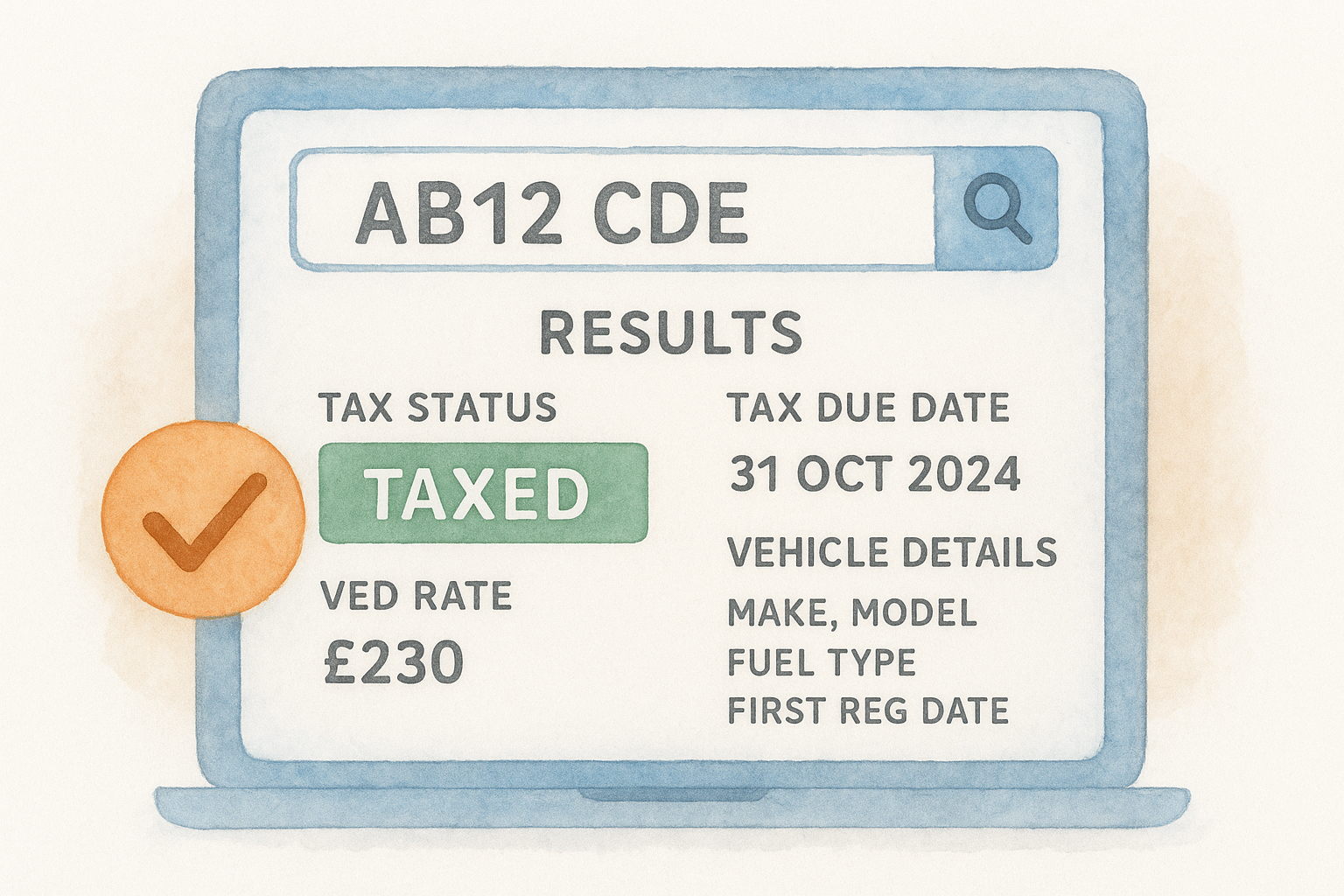
- Tax status: taxed, untaxed, or SORN
- Tax due date: the exact day the current tax period expires
- VED rate: the annual cost linked to the vehicle's band
- Vehicle details: make, model, fuel type, and first registration date
Each field maps directly to what you gathered in Step 1, so you can cross-reference instantly and flag any discrepancies before moving to the next stage.
Step 3. Confirm status, expiry and SORN
With your results loaded, work through each field methodically rather than scanning the page at a glance. A free car tax check UK lookup delivers three critical data points at this stage: whether the car is currently taxed, untaxed, or declared SORN, the precise expiry date, and confirmation that those details match what the seller has told you.
Reading the tax status result
The status field displays one of three values: taxed, untaxed, or SORN. A taxed result with an expiry date several months away is straightforward. An untaxed result means the current period has lapsed and the car cannot be legally driven on a public road until the new owner taxes it. Note down the expiry date precisely, because that date directly affects your negotiation.
If the car shows as untaxed and the seller claims it has been recently taxed, ask them to produce the payment confirmation before you proceed any further.
What SORN means for you as a buyer
SORN stands for Statutory Off Road Notification, which means the keeper has formally declared the vehicle is off the road. A SORN car is not covered for road use, and you must tax it in your own name before driving it away, even from the seller's driveway.
Check the date the SORN was registered if available. A vehicle that has been off the road for an extended period raises questions about maintenance gaps and storage conditions that a basic tax status check will not answer on its own.
Step 4. Check the VED rate and what you will pay
The VED rate shown in your free car tax check UK result tells you the exact annual cost of taxing the vehicle once it's registered in your name. Knowing this figure before you agree a price is useful, particularly if you're comparing two similar cars where the running costs differ.
How the VED rate is calculated
Your results page shows the rate that applies to the specific vehicle you've searched. The figure depends on when the car was first registered and what fuel type it runs on. Use the breakdown below to understand which structure applies:
| First registered | Rate based on |
|---|---|
| Before 1 March 2001 | Engine size (cc) |
| 1 March 2001 to 31 March 2017 | CO2 emissions band |
| On or after 1 April 2017 | First-year CO2 rate, then flat standard rate |
Electric vehicles registered on or after 1 April 2025 are now subject to the standard annual VED rate, so always confirm the current figure from your check results rather than assuming zero tax applies.
What to do if the rate looks higher than expected
Cross-reference the fuel type and CO2 figure shown in your results against the V5C logbook. Occasionally, a data entry error at registration means the wrong engine specification is recorded, which inflates the VED band. If the figures conflict, contact the DVLA directly to request a correction before you complete the purchase, as the error becomes your responsibility once the car transfers to your name.
Quick recap
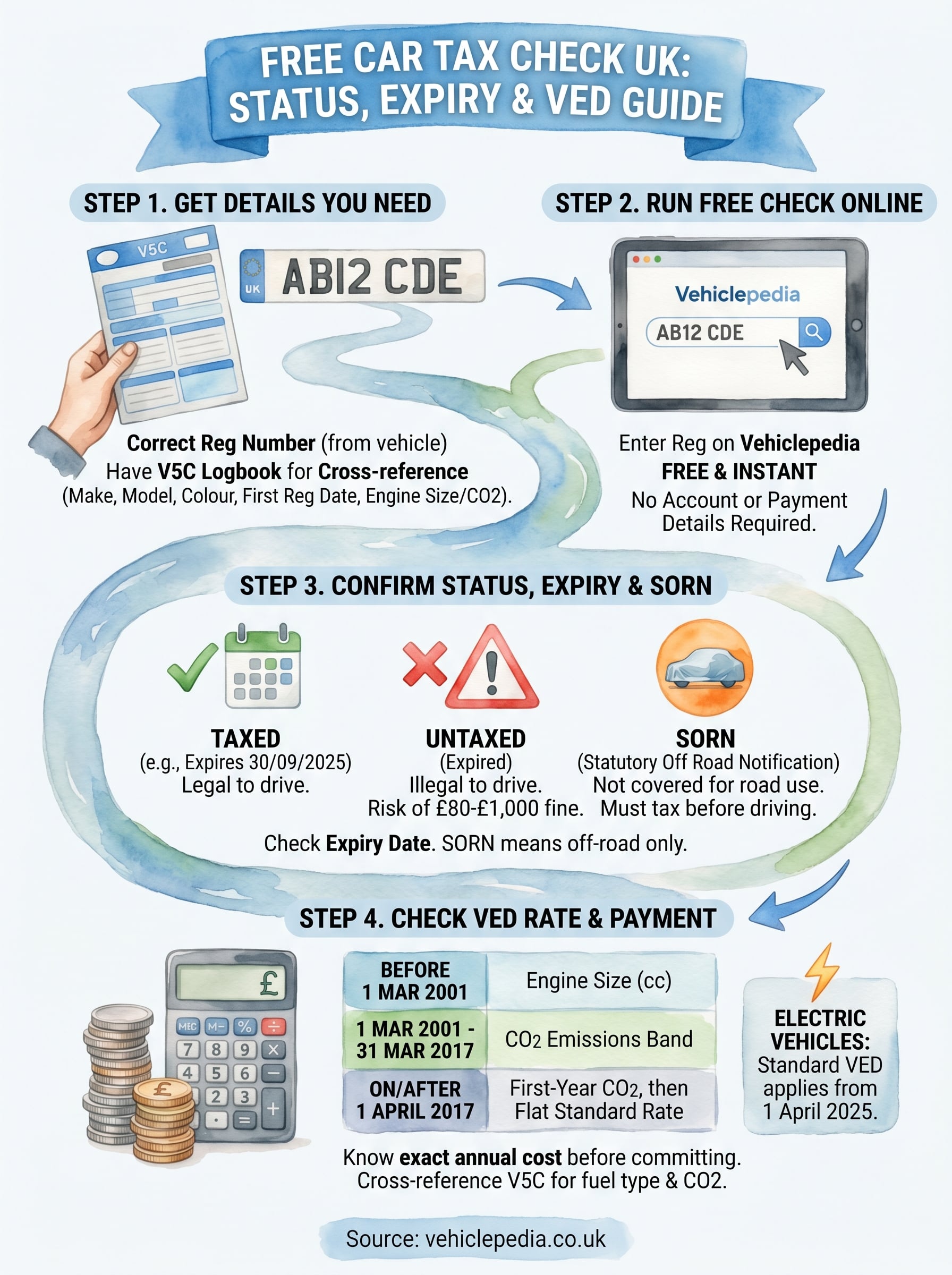
A free car tax check UK lookup gives you four key pieces of information: current tax status, expiry date, whether the vehicle is SORN, and the VED rate you'll pay once the car is in your name. Each step in this guide builds on the last, starting with confirming the registration number, running the check, reading the status result carefully, and then cross-referencing the VED figure against the V5C logbook.
The check takes under a minute, but the details it surfaces can influence your negotiating position or stop you from buying a problem vehicle outright. An untaxed or SORN car carries immediate costs and responsibilities that transfer to you the moment the sale completes, so verifying status before you agree a price is always worth doing.
If you want to go further, a full vehicle history report covers finance, write-offs, and stolen status alongside the tax data. View a sample premium report to see exactly what's included before you decide.