Free Insurance Car Check: How to Verify Cover by Reg
Learn how a free insurance car check via reg works, its limits, and why pairing it with Vehiclepedia's history check reveals hidden risks.
Free Insurance Car Check: How to Verify Cover by Reg
You've spotted a car for sale, or maybe you're worried about a vehicle parked outside your house, and you want to know if it's actually insured. A free insurance car check by registration number is possible, though not in the way most people expect. There's no single public database where you type in a plate and see live insurance status, but there are legitimate ways to check what matters, whether that's confirming a vehicle is taxed and MOT'd, spotting red flags that suggest it might be uninsured, or reporting a suspected uninsured driver.
If you're buying a used car, insurance status isn't actually the biggest risk you need to worry about. What really protects you is an outstanding finance check by registration, along with knowing whether the car has been written off or is recorded as stolen, all things a proper reg check reveals in seconds.
This guide walks you through exactly how to verify a car's status using its registration plate, what the Motor Insurance Database can and can't tell you, and how to run a free vehicle history check through Vehiclepedia to catch problems that insurance alone won't flag before you hand over any money.
What is a free insurance car check and why it matters
A free insurance car check means using your registration number to find out if a car is insured, or at least gathering enough evidence to make a reasonable judgement. Unlike checking MOT status or tax, there's no fully open public tool that lets anyone type in a plate and see "insured" or "not insured" on screen. The Motor Insurance Database (MID), run by the Motor Insurers' Bureau, holds that data, but public access is limited to protect drivers' personal details. Police, courts, and local authorities can query it directly. Members of the public get a narrower version through askMID, which confirms whether a vehicle appears on the database at all.
Understanding this distinction matters because it shapes what you should actually expect from a "car insurance check by reg". You're not getting a live policy printout with the insurer's name and expiry date. You're getting a yes or no on whether the vehicle is listed as insured right now, which is enough to flag a problem but not enough to close the loop on your own.
A reg check won't hand you an insurance certificate, but it will tell you if something's wrong.
Why this matters if you're buying a used car
Buyers often assume that if a car is being sold legally, insurance must be sorted. That's not how it works. A private seller can drive a car to meet you without valid cover, and you'd have no way to know just by looking at the vehicle. Checking gives you a data point, not proof, but it's a useful early warning sign, especially combined with other checks.
More importantly, insurance status changes the moment ownership does. Any cover the current owner has ends when you buy the car, so you'll need your own policy in place before you drive it away regardless of what the seller had. This is why a "free auto insurance quote online" search often follows straight after a vehicle history check, buyers want to line up their own cover once they've confirmed the car is worth pursuing.
What a reg check absolutely should reveal before you commit any money is whether the car has outstanding finance, has been written off, or is flagged as stolen. These issues follow the vehicle regardless of who's driving it, and no insurance check will catch them. That's where a dedicated history check becomes essential, which we'll cover in Step 3.
Step 1. Find the vehicle's registration number
Before you can run any kind of free insurance car check or free number plate check, you need an accurate registration number. Sounds obvious, but this is where most checks go wrong. A single mistyped letter or digit pulls up the wrong vehicle entirely, and you'll end up trusting data that has nothing to do with the car you're actually looking at.
Where to find the plate
Grab the reg from the number plate itself, front and rear, and make sure both match. Sellers occasionally swap plates between vehicles, so a mismatch is worth questioning on its own. If you're working from an online listing rather than seeing the car in person, ask the seller to send a clear photo of the plate alongside the V5C logbook.
Double-check before you search
Run through this quick checklist before typing anything into a lookup tool:
- Compare the front and rear plates for an exact match
- Cross-reference the reg against the V5C document if the seller has provided one
- Watch for common mix-ups: the letter O versus the number 0, and I versus 1
- Note the vehicle's make and colour so you can confirm the lookup result matches what's in front of you
Get the registration number wrong and every check you run afterwards is worthless.
Once you're confident you've got the correct plate, you're ready to move on. This same registration number is what you'll use for the Motor Insurance Database check, the vehicle history check, and any finance or write-off search, so it's worth getting right at the start rather than correcting mistakes later.
Step 2. Run a free check on the Motor Insurance Database
With your registration number confirmed, head to **askMID**, the public-facing tool run by the Motor Insurers' Bureau. This is the closest thing the UK has to an official **free insurance car check**, and it's free to use as long as you're not running bulk searches for commercial reasons. Enter the plate exactly as it appears, and the system checks it against the live Motor Insurance Database.What the result actually tells you
Expect one of two outcomes: the vehicle is listed as insured, or it returns no match. A match confirms an active policy exists somewhere on record, though it won't name the insurer or show the expiry date. No match is more serious, it either means the car has no valid insurance, or the record hasn't updated yet after a recent policy change. Insurers usually update the database within a few days, so a fresh policy might not show immediately.
No match on the database doesn't always mean no insurance, but it's a reason to ask more questions before you buy.
If you get an unclear result
Don't treat a single lookup as final proof either way. If the result seems off, especially for a car you're seriously considering buying, ask the seller directly for their insurance details or a recent renewal document. Genuine sellers won't have a problem showing you this. Hesitation or vague answers are worth noting alongside anything else that feels inconsistent about the sale.
Running this check takes under a minute and costs nothing, so there's no reason to skip it before moving on to the next step.
Step 3. Confirm the result with a full vehicle history check
Once you've checked the Motor Insurance Database, run the same registration through Vehiclepedia's free vehicle history check. Insurance status only tells you part of the story, and the risks that actually cost buyers money, outstanding finance, a write-off record, or a stolen flag, sit outside what askMID can show you. A car can pass the insurance check and still be a terrible purchase.
What a full check adds
Running a proper history check alongside your insurance lookup gives you a much fuller picture before you commit any money. Here's what it covers that insurance alone won't:
- MOT history and current status, including expiry date and past failures, through an instant MOT check by reg
- Road tax status, so you can check if a car is taxed before you drive it away
- Outstanding finance, flagging any loan still secured against the vehicle
- A free vehicle write-off check and stolen check, both premium features backed by official police and insurance registers
- Ownership history and mileage anomalies, useful for spotting inconsistencies in the seller's story
An insurance check confirms cover exists. A history check confirms the car is actually worth insuring.
Why this step can't be skipped
Skipping this step is how buyers end up owning someone else's debt or a car that's legally a write-off. Vehiclepedia sources this data exclusively from the DVLA, police databases, and insurance registers, and backs premium reports with a £30,000 data guarantee for non-trade users. You can preview a sample report first if you want to see exactly what's included before paying for the full check.
Step 4. Know what to do if the car isn't insured
Getting a no-match result on your free insurance car check doesn't mean you should walk away automatically, but it does mean you need to act carefully. Driving an uninsured vehicle is illegal in the UK, and if you're buying the car, you'll need your own cover in place before you take it anywhere, regardless of what the seller has or hasn't sorted.
If you're buying the car
Sort your own insurance policy before you drive away, even for a five-minute trip home, exactly as any step-by-step guide to buying a car privately recommends. Most insurers can issue cover within minutes online or over the phone, so there's no excuse for driving on a hope. If the seller's lack of insurance makes you uneasy about the wider sale, treat it as one more reason to run the full vehicle history check covered in Step 3 before you commit any money.
If it's a car you're worried about, not buying
Report it. You can pass details to the police via the non-emergency 101 line or, in England and Wales, notify the Motor Insurers' Bureau directly through their Insurance Database Services.
An uninsured car on the road is everyone's problem, not just the owner's.
Here's a quick reference for what to do next:
- Buying the car: arrange your own insurance before driving it, don't rely on the seller's cover
- Suspicious vehicle nearby: report the registration to police via 101
- Unclear database result: ask the seller for proof and run a full history check regardless
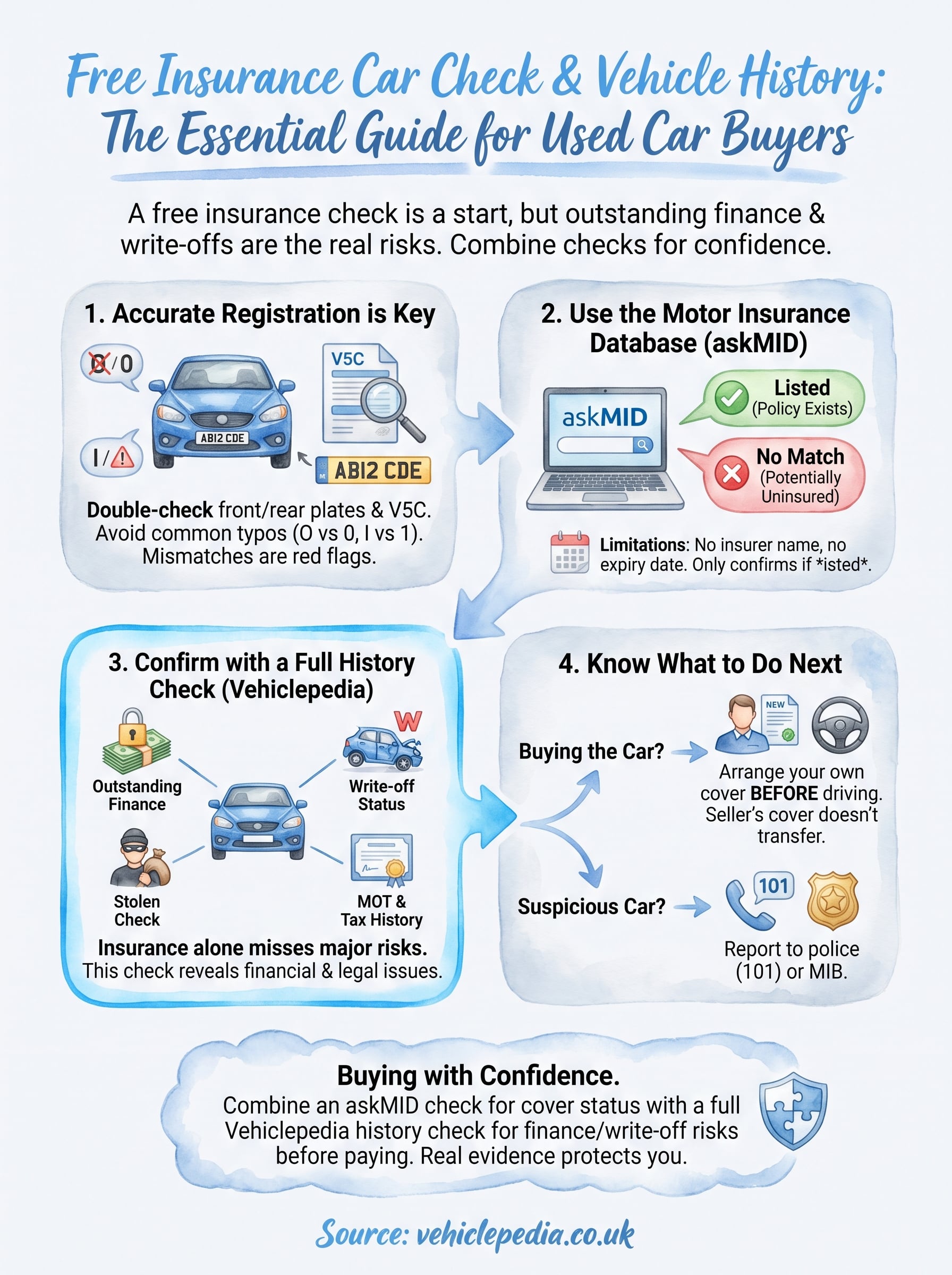
Buying with confidence
A free insurance car check is a good first move, but it's only ever one piece of the puzzle. The Motor Insurance Database tells you whether a policy exists, not whether the car is safe to buy. That's the job of a proper vehicle history check, one that pulls outstanding finance, write-off status, and stolen records from official sources rather than leaving you to guess.
Combine both, and you're no longer relying on a seller's word or a hopeful glance at the plate. You've got real evidence before any money changes hands, which is exactly what protects you if something turns out to be wrong later.
Before you commit to a purchase, run the reg through Vehiclepedia and see what a full report actually looks like. You can view a sample premium vehicle report first, then decide if the premium check is worth it for the car in front of you.