6 Best MOT Checker Apps, Free and Paid Options Compared
Looking for an MOT checker app? Compare six free options for MOT history, tax status and reminders, and see where paid features begin.
6 Best MOT Checker Apps, Free and Paid Options Compared
The best MOT checker app pulls official DVLA and DVSA data from a registration number, shows the full test history with advisories and failures, and warns you before the MOT or tax runs out. If you want a free lookup with nothing to install, Vehiclepedia and the GOV.UK service are the quickest picks. If you want a garage of saved vehicles with reminders, Vehicle Smart and KnowYourCar suit you better. The two simple Android apps near the end suit someone who wants a single lookup on a phone.
The problem is that app stores list dozens of near-identical tools. Most are free to install, and few make it obvious what sits behind a paywall. You might only want to know when your MOT expires. You might be checking a used car before you hand over cash. The right app differs for each job.
We run a free vehicle check on registration plates at Vehiclepedia, so we know what the official data contains and where it stops. This guide compares six options for a free MOT checker app or web tool, shows what each does for nothing, where paid features begin, and who each one suits.
1. Vehiclepedia
Vehiclepedia is the best pick when you want a free MOT check from a registration number without installing anything. It is a website rather than a downloadable app, so you open it in your phone's browser, type the plate and read the result. That also means nothing takes up storage and nothing asks for permissions.
What it does
The free check returns the full MOT history, current MOT status, due date and recorded mileage for the vehicle. Alongside the MOT, it shows the vehicle's tax and emissions data, so you see the whole picture of whether the car is legal to drive. Vehiclepedia takes its DVLA data directly from the DVLA API and its MOT history from the DVSA, and it refreshes that data nightly.
The free report goes beyond MOT and tax. It includes:
- Make, model, year, colour, body type and number of doors
- Performance figures such as 0-60mph, fuel efficiency and maximum speed
- Plate changes and colour changes
- Import, export and scrapped status
- A recall check
A free check is only worth trusting when the data comes straight from the DVLA and DVSA, so always ask an app where its figures come from.
Who it suits
It suits anyone who wants to check one or two vehicles quickly, with no install. That includes people comparing several used cars before choosing which to view, and owners who just want to confirm their own MOT expiry date.
- Good fit: a buyer shortlisting cars from adverts, who needs MOT history and mileage in seconds.
- Good fit: an owner who wants to confirm an MOT date on a phone browser.
- Look elsewhere: you want a saved garage of family cars with automatic alerts.
Cost and limits
The free check costs nothing. If you are buying a car, the premium report adds the checks that official MOT and tax data cannot show: written-off status from the MIAFTR insurance database, stolen status from the Police National Computer via Experian, and outstanding finance from a direct Experian Automotive feed. Premium reports carry a £30,000 data guarantee for non-trade users. You can preview a sample premium report first, and the pricing page lists current prices.
The limit is reminders. The check shows your MOT due date, but it is not a garage app that pushes alerts, so pair it with the free GOV.UK reminder described below.
2. Vehicle Smart Car Check
Vehicle Smart is the best choice when you want a proper app with a saved garage and reminders for MOT, tax and more. It is free to download with in-app purchases, and it has a 4.9 rating from over 100,000 ratings on the App Store, which is the strongest track record of the options here.
What it does
You enter a UK registration number and the app returns DVLA MOT and tax data, the full DVSA MOT history and vehicle specification. You can save your own vehicles to a garage, add photos and nicknames, and receive reminders for MOT, tax, insurance, breakdown cover and servicing. It also covers motorbikes, vans and HGVs.
The feature list is wide:
- Police PNC stolen status and outstanding DVSA safety recalls
- Mileage and MOT data insights, plus a tyre age check
- A Fuel Finder for cheaper petrol and diesel
- Car insurance quotes and tax band costs
- A PCP and lease mileage tracker
- A notes section for tyres, fluids and bulbs
Reminders are the feature that actually prevents a missed MOT, so pick an app that makes them part of the free setup.
Who it suits
It suits owners with more than one vehicle, families who want to watch each other's MOT dates, and anyone who likes keeping tyre sizes, service history and insurance renewals in one place. It is also handy for classic or second vehicles that you only use occasionally.
- Good fit: a household with two or three cars and a motorbike.
- Good fit: someone who forgets insurance and breakdown renewals as well as MOTs.
- Look elsewhere: you only want a single lookup and dislike upsell screens.
Cost and limits
The basic lookup and garage are free. Extras such as additional garage storage, photos, ANPR, backup and restore, and plate transfers sit behind a premium upgrade. Full vehicle checks for stolen, written-off and finance status are paid, and the app lists a £30,000 data guarantee on them.
Read the upgrade screen before you pay. The developer says its Detailed Vehicle Spec is not part of premium, because DVLA terms require some data items to sit behind a paywall. Some reviewers say they were unsure what the upgrade included, so check the feature list first.
3. KnowYourCar
KnowYourCar is the best pick if you want MOT statistics and a free tier with a generous vehicle limit. It combines MOT and tax checks, reminders and optional history checks in one app, and its MOT and tax data is licensed under the Open Government Licence v3.0.
What it does
You enter a registration and get MOT and tax status, MOT and mileage history, and a prompt to store insurance and breakdown details. The app adds reminders for MOT, tax and insurance, and it tells you the likelihood of your model passing its next MOT. The developer says it analysed over one billion MOT test results to produce those statistics.
Other features include:
- A "Prepare for MOT" section and a service interval tracker
- Notes, fuel cost logging and lease or PCP end date reminders
- A list of garages near you and online booking requests
- Add-on data packs for tyre pressures, correct oil, wiper blades, bulbs and battery
- An Alexa skill, for registered users
A pass-rate statistic for your exact model tells you what to check before the test, not just when the test is due.
Who it suits
It suits owners who like preparing for the MOT rather than only tracking the date. If you want to know which faults are common on your model, and you want to get ahead of them, the statistics are useful. It also suits people who want to run a full history check from the same app when they buy.
- Good fit: an owner of an older car who wants to avoid avoidable failures.
- Good fit: a buyer who wants MOT history and a paid history check in one place.
- Look elsewhere: you dislike advertising in free apps.
Cost and limits
The free tier covers MOT and tax, MOT and mileage history, MOT model statistics, standard reminders and storing insurance information, for up to five vehicles. Ads show on the free tier. Premium removes ads, lifts the five-vehicle limit and adds custom notes, custom reminders and extra detailed information. It also includes £3.99 of credits for a Silver history check or four add-on data packs.
Its full vehicle checks come in tiers. Gold includes a £30,000 data guarantee, outstanding finance, log book loan and extended mileage checks. Silver covers stolen, written-off, imported, exported and scrapped status. The in-app page lists full car checks from £3.99.
4. GOV.UK check MOT history
The GOV.UK service is the best choice for a free, official lookup with free reminders, even though it is not an app. You use it in a browser on any phone, and the data is the source that the other tools in this list rely on.
What it does
On the GOV.UK MOT history service you enter a registration number and see the vehicle's MOT test results, including advisories, failures and recorded mileage. A separate vehicle tax check shows whether the vehicle is currently taxed. GOV.UK also offers a free MOT reminder by text or email for your own vehicle, so you do not need an app for alerts.
There is no account to create for a lookup and no data to hand over beyond the plate. The service works for any vehicle with an MOT history, and it is what garages and buyers cross-check against.
If an app's MOT figures disagree with GOV.UK, trust GOV.UK, because it is the primary source.
Who it suits
It suits anyone who wants zero install, zero ads and zero upsells. If you have one car and one phone, a bookmark and the free reminder cover most of what you need. It is also the right place to double-check a result from any app before you rely on it.
- Good fit: an owner with one vehicle who only needs a reminder.
- Good fit: a buyer who wants an official second opinion.
- Look elsewhere: you want a garage of saved vehicles, stolen checks or finance checks.
Cost and limits
The lookup and the reminder are free. The limits are about convenience. You cannot save a garage of vehicles, and the service does not check for stolen status, outstanding finance or insurance write-offs. Those need a premium vehicle history report from a provider that licenses the police, finance and insurance data, such as the premium report from Vehiclepedia.
5. MOT Car Check on Google Play
MOT Car Check is a straightforward Android lookup app. It suits you if you want a single-purpose tool that takes a registration number and returns MOT and tax details, and you do not need a garage or a long feature list.
What it does
Its Google Play listing describes a simple flow: you enter a registration number to quickly access MOT history and tax information, and you use it to check a UK vehicle before you buy, sell or drive it. That covers the basic job of confirming whether a vehicle has a valid MOT and whether it is taxed.
For a lookup app, the checklist is short:
- MOT history and status for a UK registration
- Tax information
- Use before buying, selling or driving a vehicle
A simple lookup app is fine for one-off checks, but you should verify any result that matters against GOV.UK.
Who it suits
It suits Android users who only ever do an occasional lookup, such as checking a friend's car or a roadside advert. It is the kind of tool you install when you do not want to learn a garage system.
- Good fit: someone who checks a vehicle a few times a year.
- Good fit: a casual buyer who prefers an app icon to a browser bookmark.
- Look elsewhere: you want reminders, multiple saved vehicles or a history report.
Cost and limits
Before installing, check the current listing for price, in-app purchases and reviews, because simple lookup apps differ on whether they show ads or charge for extras. Also check whether it offers reminders, since many apps in this category skip them. If it does not, set up the free GOV.UK reminder alongside it.
6. MOT History ROAD TAX Car Check
MOT History ROAD TAX Car Check is a second simple Android option. It is the best of the two basic apps if your priority is the reasons behind a failure, because its listing highlights test advisories and failure reasons.
What it does
The listing says you can retrieve the MOT history and tax status of any UK-registered vehicle, including test advisories and reasons for failure. In practice that means you can read why a car failed in the past, which matters more than whether it eventually passed.
The key points from the listing:
- MOT history for any UK-registered vehicle
- Tax status
- Advisories and reasons for failure shown for each test
A pass certificate tells you the car was fine on the day, but the advisories tell you what the next owner will pay for.
Who it suits
It suits buyers who want to read the story of a car's tests on an Android phone. It also suits owners who want to see which advisories keep repeating from one year to the next, because a recurring advisory usually means a repair has been put off.
- Good fit: a buyer standing next to a car and reading its past advisories.
- Good fit: an owner tracking whether an advisory has been fixed.
- Look elsewhere: you want finance, stolen or written-off checks.
Cost and limits
As with the other simple app, check the live listing for price, ads and in-app purchases before you install. It is a lookup tool, not a vehicle history report, so it will not show outstanding finance, stolen status or insurance write-offs. For those you need a premium check, and a free lookup alone cannot replace it when you are about to buy.
How the six options compare
All six options cover the core job of showing MOT and tax status from a registration number. They differ on reminders, saved vehicles and what they charge for. The table puts the main points side by side, and the picks below it match each option to a type of reader.
Feature comparison
| Option | Type | Free MOT and tax lookup | Reminders | Paid extras |
|---|---|---|---|---|
| Vehiclepedia | Website | Yes, with MOT history, due date and mileage | Pair with GOV.UK reminder | Premium report with written-off, stolen and finance checks |
| Vehicle Smart | App | Yes | MOT, tax, insurance, breakdown, servicing | Premium upgrade and full vehicle checks |
| KnowYourCar | App | Yes, up to 5 vehicles with ads | Standard free, custom on premium | Premium, add-on packs, Silver and Gold checks |
| GOV.UK | Website | Yes | Free MOT reminder by text or email | None |
| MOT Car Check | Android app | MOT history and tax information | Check the listing | Check the listing |
| MOT History ROAD TAX Car Check | Android app | MOT history, tax, advisories and failure reasons | Check the listing | Check the listing |
Which one to pick
Match the option to the job rather than to the longest feature list. One-off lookup before buying points to Vehiclepedia, with the GOV.UK service as a cross-check. A household garage with automatic alerts points to Vehicle Smart or KnowYourCar. The quickest free reminder for one car is GOV.UK.
Between the two garage apps, choose Vehicle Smart if you want a broad toolbox with insurance, fuel and lease tracking. Choose KnowYourCar if you want pass-rate statistics and a bigger free allowance. The two basic Android apps fit best as a light lookup on a phone where you want an icon on the home screen.
What to check before you download an MOT checker app
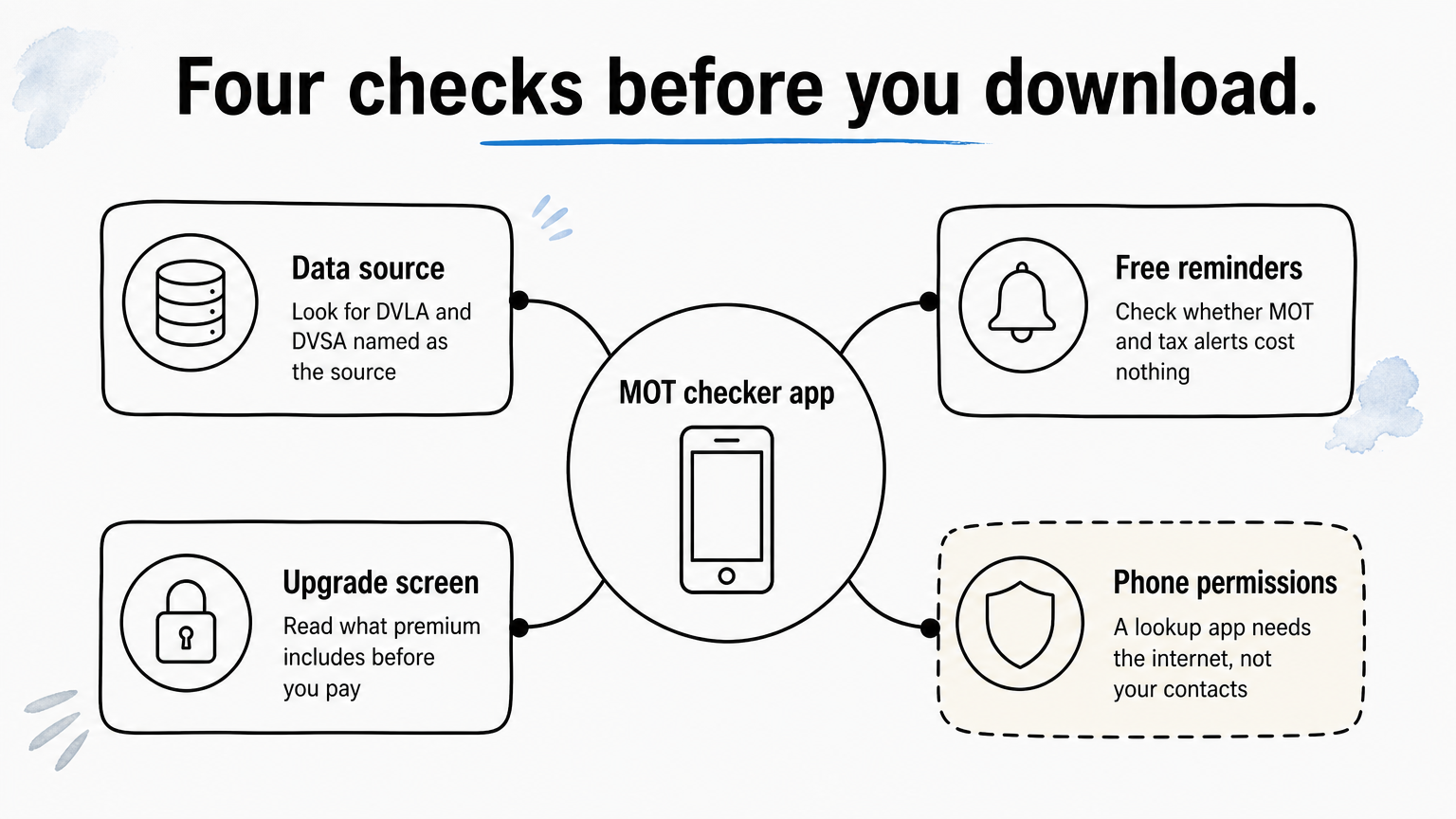
Before you install any MOT checker app, check four things: where it gets its data, whether reminders are free, what the upgrade really unlocks, and what it asks to access on your phone. Two minutes on the store listing saves you from a paywall surprise later.
Data source and reminders
Look for a clear statement that the app uses DVLA and DVSA data. These are the bodies that hold MOT and tax records, so an app that does not name its source is harder to trust. Any figure that matters, such as an expiry date, is worth confirming on GOV.UK.
Then check whether reminders are included free. The point of an MOT reminder is to give you time to book. You can get an MOT up to a month minus a day before it expires and keep the same renewal date. So if your MOT runs out on 20 June, you can test from 21 May and the new certificate still runs from 20 June. Set your alert for four to six weeks before expiry so you have room to find a garage slot.
Set the reminder for about six weeks before expiry, because that leaves room to book and to fix any failure before the deadline.
Upgrade screens and permissions
Free apps usually earn money from premium upgrades, ads or paid history checks. That is fair, but read what you are buying. Reviews of one popular app show users misunderstanding which data sits behind premium, so look at the feature list on the upgrade screen before paying and avoid paying for something you can get free on GOV.UK.
Also check the permissions. A lookup app needs the internet and perhaps notifications. It does not need your contacts. Store listings show what data an app may collect, so skim that section before you install.
- Name of the data source on the listing
- Free reminders, or paid only
- Number of vehicles you can save for free
- What premium includes, in plain words
- Permissions requested on install
How to read an MOT history before you buy a car
An MOT history is most useful for three things: repeated advisories, failures that were fixed on the day, and mileage that rises sensibly. A clean run of passes is a good sign, but the detail inside each test matters more than the pass or fail label.
Advisories and failures
Test results fall into dangerous, major, minor and advisory items. Advisories are warnings, not failures, so a car can pass with several. Treat an advisory such as corrosion or worn brake discs that appears two years running as a sign that the owner has deferred the repair. That repair is likely to land on you.
Failures tell a different story. A failure that was fixed and retested the same day is normal, and often just a bulb or a wiper. Several major failures for the same system, like suspension or brakes, suggest a problem that keeps coming back.
A repeated advisory is a repair someone chose not to make, and you may be the one who pays for it.
Mileage
Each test records the odometer reading, so the history gives you a mileage trail. The numbers should climb steadily. Take a simple example: 41,800 at one test, 52,300 the next year, then 38,100 the year after. The last figure drops by 14,200 miles, so either the clock was wound back, the reading was mistyped, or the odometer was replaced. Ask the seller to explain it before you go further.
Large gaps matter too. A car that adds only a few hundred miles in a year may have been off the road, which is not a problem in itself but is worth asking about. Combine the mileage trail with a check on the plate for import, scrapped and colour change records. These records are in the free check, and a premium report adds written-off, stolen and finance status.
Free MOT checker app or paid check: where the line sits
A free MOT checker app tells you what the official records say about the MOT and tax. It does not tell you whether the car is stolen, written off or still owed to a finance company. Those facts come from police, insurer and finance databases that cost money to license.
What a free check covers
A good free check covers the vehicle's MOT history and mileage, tax status, model and performance details, and import or export records. It is enough to confirm that the advert matches the car and to spot mileage that does not add up. For owners, it is all you need, along with a reminder.
Free is also the right starting point for buyers. Run the free check on every car on your shortlist, because it costs nothing and rules out cars with suspicious MOT or mileage records. Spend money only on the car you intend to buy.
When a paid check is worth it
Pay for a history report when you are about to hand over money. The risks it covers are the expensive ones: outstanding finance can mean the car is repossessed from you, a stolen car can be seized, and an unreported write-off can hide structural damage. A premium report that checks these, with a data guarantee such as the £30,000 guarantee on Vehiclepedia's premium reports for non-trade users, costs far less than any of those outcomes.
Use the free check to rule cars out and the paid report to rule one car in.
Compare what each report covers rather than its headline price, and read the guarantee terms. The FAQ page explains how Vehiclepedia's reports work.
Pick one and check your MOT today
The simplest set-up is this: use a free lookup to see your MOT history, add a reminder you will not miss, and keep the paid history report for the car you are about to buy. For a garage of vehicles, Vehicle Smart or KnowYourCar fit best. For one car, GOV.UK's free reminder does the job.
If you are checking a used car, start with the free check at Vehiclepedia, then look at the sample premium report to see exactly what the extra written-off, stolen and finance checks show before you decide.