Check for SORN: How to See If a Vehicle Is off the Road
Learn how to check for SORN with just a reg number. Read the DVLA result, tell taxed, SORN and untaxed apart, and know what to do before you buy.
Check for SORN: How to See If a Vehicle Is off the Road
To check for SORN, enter the vehicle's registration number into the free GOV.UK vehicle tax checker and read the tax status in the result. If it says SORN, the keeper has told the DVLA that the vehicle is off the road. If it says taxed, the vehicle can be used legally, and if it says untaxed, the keeper owes either tax or a SORN declaration. The check takes under a minute and needs no account.
The problem is that a parked car looks the same whether it is taxed, SORN or simply untaxed. A seller may tell you it has been laid up for the winter, or that the tax runs out next week, and you cannot tell by looking. Guess wrong and you could drive home an untaxed vehicle, collect an automated penalty, or buy a car you cannot legally move.
This guide covers four steps: get the registration number right, run the DVLA check, read the result, and act on it. Vehiclepedia takes its DVLA data directly from the DVLA API and refreshes it nightly, so the second source in step 2 draws on the same official record.
What SORN means and why you should check it
A SORN is a declaration to the DVLA that a vehicle is off the road, and a quick check shows whether the keeper has made one. The result tells you whether a vehicle is legal to use or buy without surprises.
What a SORN declaration does
SORN stands for Statutory Off Road Notification. The keeper tells the DVLA that the vehicle is not used or kept on a public road, so it needs no vehicle tax. There is no end date and no yearly renewal. The SORN lasts until the vehicle is taxed again.
A SORN vehicle must stay on a driveway, in a garage or on other private land. Leaving it on the public road can bring a fine of up to £2,500. The only driving normally allowed is to a pre-booked MOT test.
A SORN vehicle is legally parked, not legally drivable.
When to check for SORN
Run a check for SORN whenever the answer changes what you do next:
- Before you view or buy a used car, to see whether the seller's story matches the DVLA record.
- After you declare your own SORN, to confirm the record has updated.
- Before you drive a vehicle that has sat unused for months.
- When you manage a family or business vehicle and want to know its legal status.
Anyone with the registration number can run the check. You do not need the keeper's permission, which makes it a safe first step in any private sale.
Step 1. Get the registration number right
You only need the vehicle's registration number, but it must be exact. A single wrong character returns the wrong vehicle or no result, so spend ten seconds confirming it.
Find and verify the number plate
Read the number from the plates on the vehicle, then compare it with the advert and the V5C logbook. Watch for look-alike characters: O and 0, I and 1, S and 5, B and 8. Spaces do not matter.
If the plate on the car differs from the number on the V5C or in the advert, ask the seller why before you go further. A transferred private plate is legitimate, but you should hear the explanation and see the paperwork.
What you do not need
You do not need the keeper's name, a login or the V5C reference number. Those 11-digit and 16-digit references are only needed to declare a SORN, not to check one. Have these ready instead:
- The registration number, typed exactly.
- The make and colour of the vehicle, which the checker asks you to confirm.
- The seller's claims about tax and MOT, so you can compare them with the result.
The registration number is the only key you need, so check it twice.
Step 2. Run the DVLA check
The DVLA's own checker is the quickest way to check if a vehicle is SORN, and it is free. Then compare it with a second lookup to catch typos and confirm the picture.
Use the GOV.UK vehicle tax checker
Follow these steps on the GOV.UK check if a vehicle is taxed page:
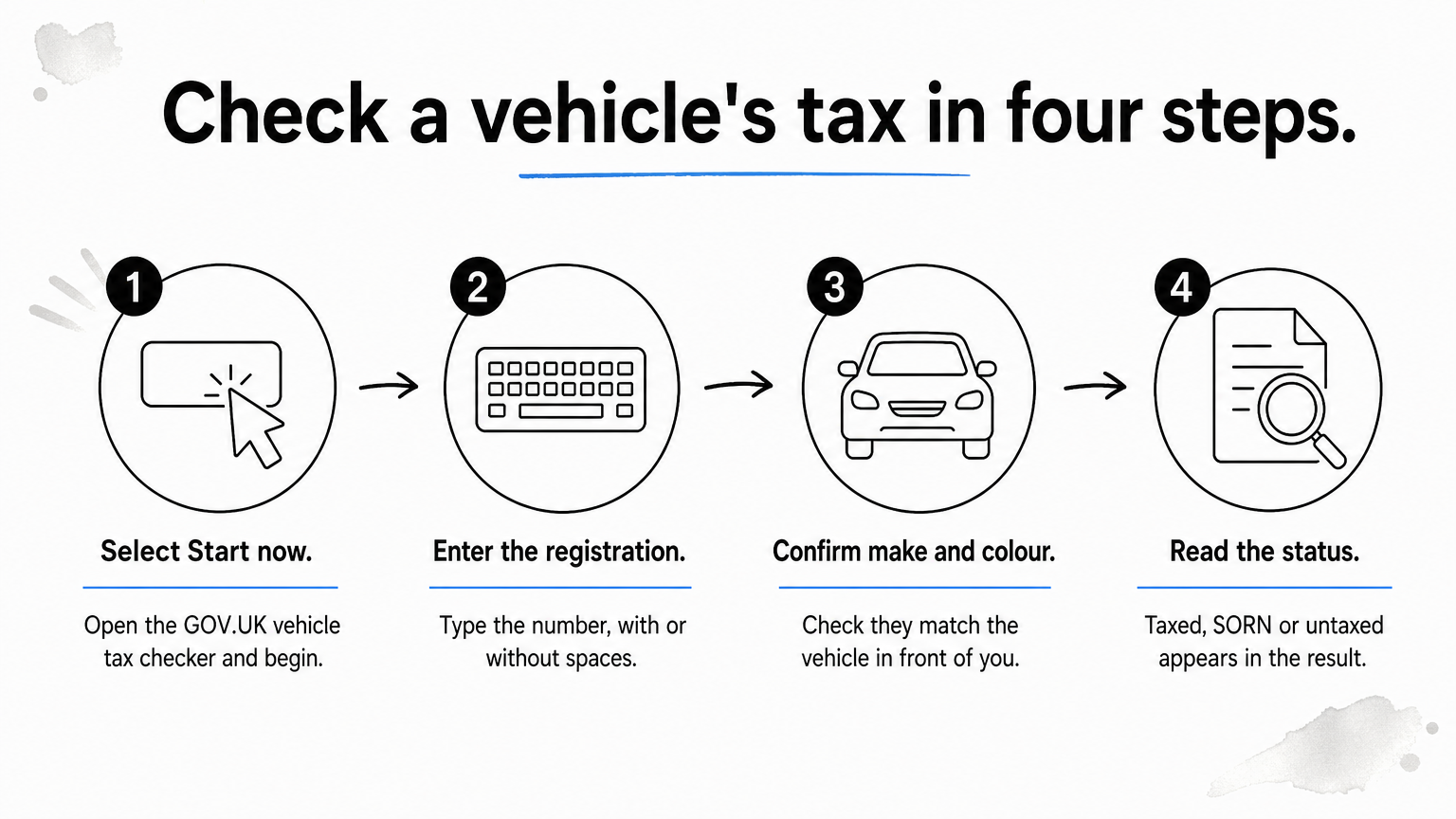
- Select Start now.
- Type the registration number with or without spaces.
- Confirm that the make and colour shown match the vehicle in front of you.
- Read the tax status in the result.
If the make or colour is wrong, stop. You have either mistyped the number or the vehicle is not what the seller says it is.
Cross-check with a free reg lookup
A second source costs you nothing and protects against a typo. Vehiclepedia's Free Check takes the same registration number and returns tax and emissions details, MOT history, an export check, a recall check and the make and model. The data comes from official sources and is updated nightly.
Compare the tax line with the GOV.UK result. If both agree, you can trust the status. If they differ, re-enter the registration number and note the time, because a very recent change may not have reached every lookup yet.
Two lookups that agree are worth more than one you hope is right.
Step 3. Read the tax status correctly
The result shows one of three statuses, and each one tells you something different about the vehicle's legal position. Knowing which is which stops you mistaking an untaxed car for a SORN one.
The three results you can see
| Status | What it means | Can it be driven on the road? |
|---|---|---|
| Taxed | Vehicle tax is up to date | Yes, with valid insurance and an MOT where one is required |
| SORN | The keeper has declared it off the road | No, apart from to a pre-booked MOT test |
| Untaxed | No tax and no SORN on record | No, and an automated £80 penalty is likely |
The difference between SORN and untaxed matters. A SORN is a deliberate declaration that protects the keeper. Untaxed means the keeper has done nothing, and the DVLA can act on that.
Spot results that do not add up
Compare the result with what you were told. A seller who says "it's driven daily" while the record shows SORN has a problem, and so does an advert that says "taxed" when the checker says otherwise.
Look at the MOT status shown with the tax result as well. An expired MOT matters, because a vehicle needs a valid MOT (if one is required) before it can be taxed. A SORN car with no MOT is not necessarily a bad buy, but it needs a test before it can go back on the road.
A mismatch between the advert and the record is the most useful thing a check can find.
Step 4. Act on what the check shows
Your next move depends on the status. A SORN result is not a reason to walk away, but it changes what you can do, and what you must do before the vehicle moves.
Allow for update delays
A SORN declared online with the 11-digit V5C reference normally takes effect straight away. If it was made with the 16-digit reference from a tax reminder in the month the tax expires, the SORN starts on the first day of the next month. Postal declarations take longer still.
Even after the SORN starts, allow a few days for every checker to show it. If a seller says they declared it yesterday and the record shows nothing, ask for the confirmation they received, then check again later.
Protect yourself as a buyer
A SORN does not carry over to a new keeper, so you must tax the vehicle in your own name before it goes on a public road. You also need insurance, and an MOT if the vehicle is old enough to need one.
Take a worked example. You agree to buy a SORN hatchback on Saturday, and the seller offers to let you drive it home untaxed "just this once". Don't. Tax it online first, then drive. Skipping that step risks the £80 automated penalty and a vehicle that was never legal to move.
Tax status is only one risk. Vehiclepedia's premium reports add written-off, stolen and outstanding finance checks, with a data guarantee of up to £30,000 for non-trade users.
Tax the vehicle in your name first, then move it.
Your next move after the check
A SORN check takes a registration number, a minute and the free GOV.UK tool. Read the status, confirm it with a second lookup, and treat any mismatch with the seller's story as a reason to slow down. Taxed means it can be used, SORN means it must stay off the road until taxed, and untaxed means the keeper has some explaining to do.
Tax status is one part of a used car's history. If the SORN result is clean and you are close to buying, preview a sample premium report to see how the finance, stolen and written-off checks work before you commit.